Recording job interview calls
Recording a phone interview lets you conduct the conversation instead of transcribing it — you ask better follow-up questions when you are not writing, and afterwards you have the exact wording of what was asked and what was promised. It works from any US phone by merging a recording number into the call, with no app on either side. The one thing that decides whether you may do it is not where your company is: it is where the candidate is sitting.
Record your next job interview
Dial this number, add the other person, and merge. Your download code arrives by SMS the moment you hang up.
- +18446730242
By continuing you consent to receive transactional text messages from RecordableCall for notifications and alerts. Reply STOP to opt out, HELP for help. Message and data rates may apply. Message frequency may vary.
Already have a code? Get your recording
Who this is for
- Hiring managers running phone screens
- Recruiters handing candidate notes to a hiring team
- Founders hiring without an ATS or a note-taker
- Candidates who want their own record of what was offered
What a recording gives you that notes do not
Interview notes are a summary written by someone who was also talking. They compress, they paraphrase, and they are written in the direction of the impression already forming. A recording is the conversation itself.
- The exact phrasing of a commitment — start date, salary band, reporting line, remote policy — rather than someone's recollection of it.
- A defensible record if a hiring decision is questioned later, showing every candidate was asked the same questions.
- Something a second interviewer can listen to instead of scheduling a repeat call with the candidate.
- Your own follow-up questions, which is where most interviewers find they were leading the witness.
Running the call
- Dial the recording number first, before you call the candidate, so nothing is missed at the top of the call.
- Add the candidate with "Add Call" and merge. The line is silent — it does not announce itself, so you have to.
- Say you are recording, say why, and ask if that is alright. Wait for the answer and let it be captured.
- If the candidate declines, hang up the recording leg and carry on. A candidate who says no should not sense any cost to saying it.
- Download the file as soon as the call ends and store it wherever your other hiring records live.
Keeping it fair across candidates
Recording one candidate and not another creates an evidence asymmetry that is difficult to explain later. If you record phone screens for a role, record all of them, and tell every candidate the same thing in the same words.
Be deliberate about how long you keep interview audio. Hiring records attract retention obligations that vary by employer and jurisdiction, and audio of a candidate discussing their circumstances is more sensitive than a scorecard. Decide the retention period before you start recording, not after someone asks for their file.
How it works
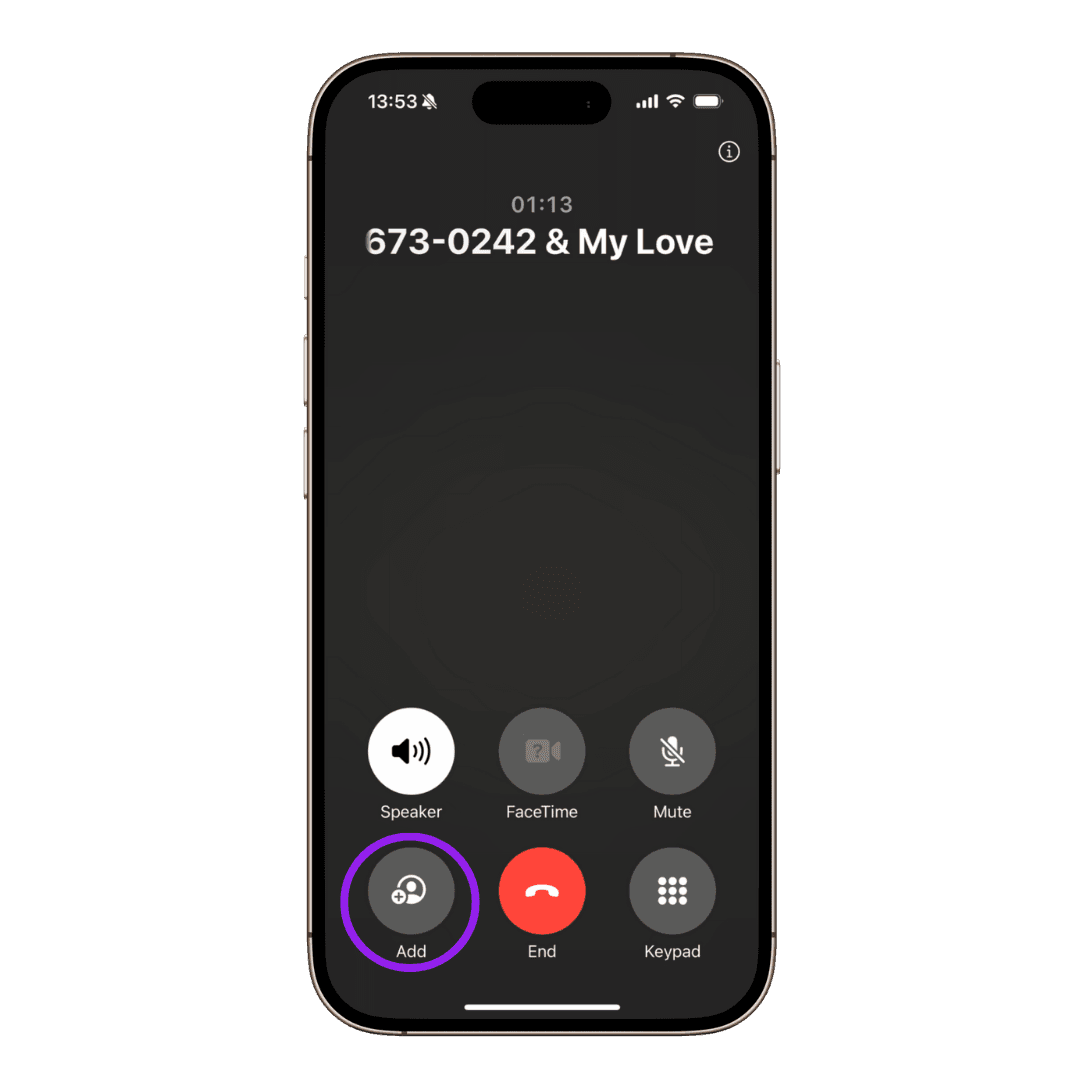
The whole mechanic is a three-way call. Your phone already knows how to do it — the recording line is just the third participant, and it stays silent for the whole conversation.
Notes, not just a recording
For an interview, the notes pull out every question asked, the commitments made about scope, comp and start date, and what you owe the candidate next.
You choose what kind of call it was when you collect the recording, so the notes match the conversation you actually had. The full transcript sits underneath, with each speaker labelled, so anything you rely on can be checked against what was said.
The candidate's location sets the rule
Consent follows the people on the call, not your office. A hiring manager in Texas interviewing a candidate in California is on a call that touches an all-party consent state, and the stricter rule governs. Since candidates apply from everywhere, phone screens are the use case where this bites most often.
The practical answer is simple: ask every candidate, every time. It costs you four seconds, it removes the need to work out where they are, and a candidate hearing you ask permission is a candidate forming a good impression of the employer.
- Never record a candidate who has said no, in any state.
- Do not use a recording to revisit protected characteristics that came up incidentally — the recording exists to check what was asked and offered.
- If the candidate asks for a copy, have an answer ready before the call, not after.
RecordableCall operates in the US and is offered in the 38 states where your own consent as a participant is sufficient. Consent follows the people on the call, so if anyone is in an all-party state, everyone must agree.
Questions about job interviews
- Can I record a phone interview without telling the candidate?
- Legally it depends on where every person on the call is located, and candidates apply from all over the country. Practically, no — you should tell them. Asking takes seconds, removes the guesswork about which state's rule applies, and a candidate who discovers a recording they were not told about is a candidate you have lost.
- Do I need an app to record a phone interview?
- No. The recording happens on the phone network, not on your handset, so any US mobile or landline that supports three-way calling works. The candidate installs nothing and needs no account.
- Should candidates be allowed to record the interview themselves?
- That is your policy to set, but be consistent. If you record and they may not, say so up front and explain why. The same consent rules apply to them, and a candidate in an all-party state needs your agreement just as you need theirs.
- How long should we keep interview recordings?
- Decide before the first call and apply it to everyone. Interview audio is more sensitive than written notes and sits inside whatever retention obligations already apply to your hiring records. Download the file and store it with those records rather than leaving it where the recording was delivered.
General information, not legal advice. Recording law turns on the facts of your call and on where each participant is located — see our Terms of Use and verify the current position before relying on it.
Ready to record?
Dial this number, add the other person, and merge. Your download code arrives by SMS the moment you hang up.
- +18446730242
By continuing you consent to receive transactional text messages from RecordableCall for notifications and alerts. Reply STOP to opt out, HELP for help. Message and data rates may apply. Message frequency may vary.
Already have a code? Get your recording